Keybindings
Open Options -> Keybindings to change Replica and standard client shortcuts. Press Backspace while capturing a key to restore its default, or Delete to leave the action unbound.
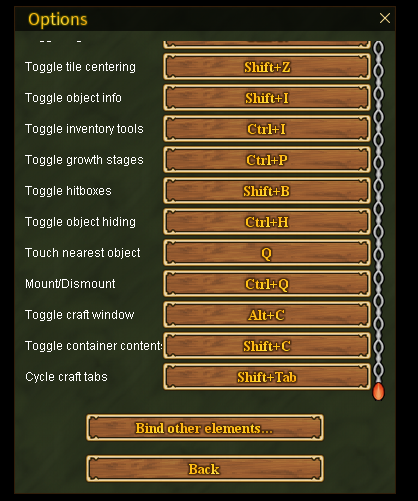
The most commonly used Replica defaults are:
| Action | Default |
|---|---|
| Drink | ` |
| Toggle mining coverage | Ctrl + D |
| Toggle farming radii | Shift + D |
| Toggle night vision | Ctrl + N |
| Toggle tile centering | Shift + Z |
| Toggle object information | Shift + I |
| Toggle inventory tools | Ctrl + I |
| Toggle crop growth stages | Ctrl + P |
| Toggle hitboxes | Shift + B |
| Toggle object hiding | Ctrl + H |
| Interact with nearest object | Q |
| Summon and mount nearest horse | Ctrl + Q |
| Toggle enhanced craft window | Alt + C |
| Toggle container contents | Shift + C |
| Cycle craft tabs | Shift + Tab |
Main UI, map, camera, walking-speed, and combat bindings are configured on the same page. Log out and Switch character are available there but are unbound by default.
Documentation pages show the default key when one exists. Your configured binding always takes precedence.